A team running an AI agent is responsible for a product they cannot really see. Users do not click buttons. They type, in their own words, for the thing they actually want. Locus was built to give the team that picture. Here is what it is, why we built it, and how it works.
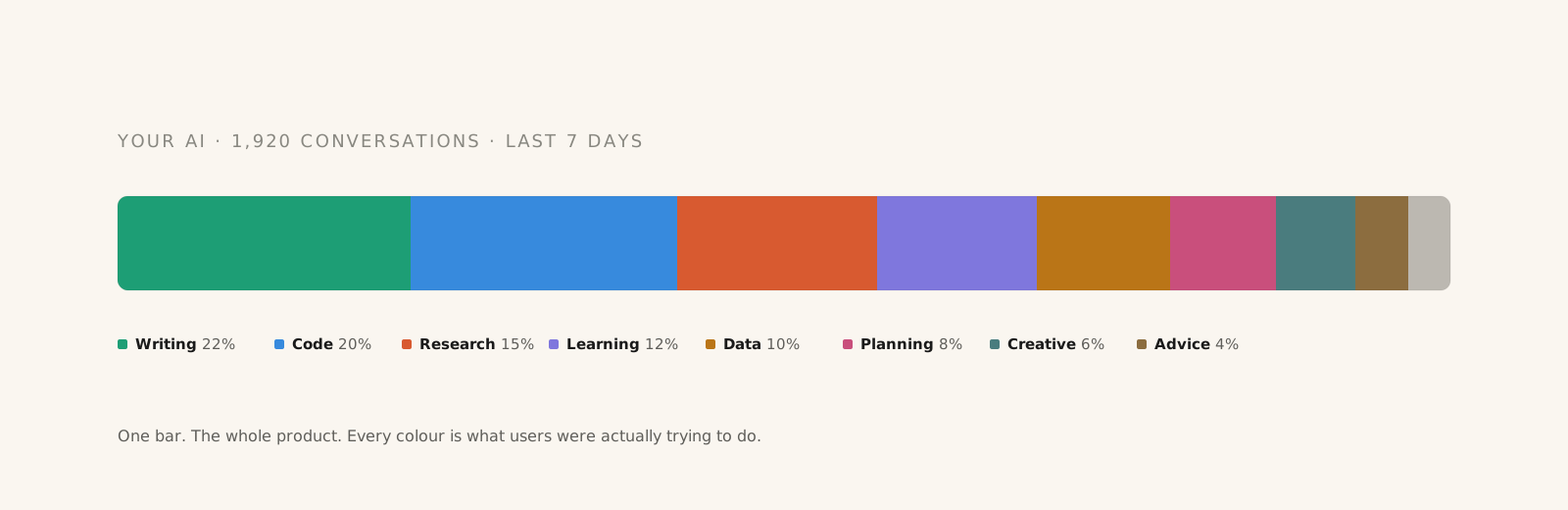
Every company building an AI agent has the same question. What are our users actually using this for? It sounds simple. It is not. The people who pay for the product do not click a button called writing or a button called code. They type in plain words. They ask for help. They describe a goal. The product figures out the rest. That leaves the team with a pile of conversations and no clear way to read them. In a typical month, an agent in production generates around 94,000 conversations. A product manager reads about 212 of them. That leaves 99% of the signal in the dark.
Locus reads the pile. It groups every conversation by what the user was trying to do. It groups every user by what they spend their time on. It rolls the whole user base up into a handful of behaviours the team can talk about. You open it in the morning. You see the shape of your product in under a minute.
Locus is product analytics for AI agents.
Product analytics for a normal web app is built around events. A user clicks a button. An event fires. The event goes into a database. A dashboard counts it. You end up with charts of how many people clicked what, when, and in what order.
AI agents do not work that way. There are no buttons to click. The user types a sentence. The agent reads it, thinks, sometimes runs a tool, and writes back. The whole thing is a conversation. None of the older analytics tools know what to do with a conversation. They can count that it happened. They cannot tell you what it was about.
So teams end up guessing. The product manager reads twenty conversations a week and calls that research — we wrote a whole post on why the sample of twenty fails and what to do instead. The VP asks how the product is going and gets a vague answer. The roadmap gets built on a feeling, not on a real read of what users are doing. Locus was built to fix that.
What problem does Locus solve?
A team running an AI agent has to make calls about a product they cannot really see. Here is a concrete example. You ship a coding agent. Half your users are doing frontend work. The other half are writing backend services. A smaller third group is using it to learn a new framework. Each of those three groups wants something different from the product.
Today, there is no tool that shows you those three groups. Observability tools show you one conversation at a time. Dashboards roll every conversation into a single number called active users. Nothing sits in the middle, which is the place where product decisions actually get made. Locus fills that gap. The reason no other tool does is structural — the data is already there, it just lives as free text that no traditional analytics tool can read. And the groups that matter are behavioural, not demographic, because plan tier is not a behaviour.
Three things teams need to know and cannot find today.
- What percent of your users mostly do each kind of thing in your product.
- How one specific user actually spends their time when they use you.
- Which group of users matches a specific profile, for a beta, a research call, or an outreach list.
Any team running an AI product has been asked at least one of these questions this week. Most of them had to make something up to answer it.
How Locus works.
Imagine one user of your AI agent. Over the last thirty days, they had eight conversations. Four were about frontend work. Two were about deployment scripts. One was about a bug. One was about writing an email. That is this user's mix. Half frontend, a quarter deployment, an eighth bug, an eighth writing.
Every user of your product has a mix like this. Some users look alike. Those users form a group. A group is a set of users who spend their time on the same kinds of things. It is not their plan tier. It is not the country they signed up from. It is what they actually do.
Roll up every group and you get the shape of the whole product. Forty percent of your users are frontend first. Thirty percent are backend first. Twenty percent are writing first. That is the top view. That is what you open Locus to every morning.
The three ways you look at your users.
Locus has three zoom levels. They all use the same picture. Only the thing being measured changes. Once you read one view, you can read every view. That is the whole design.
The whole user base.
A single horizontal bar across the top of the page. It shows how your whole user base breaks down by group. You read it in five seconds. This is the view you start every session with. It tells you the shape of your product right now.
The users inside one group.
Click any colour on that bar and you zoom into that group. You see every user in it. Each user has their own small bar showing how they personally spend their time. You can sort them by how typical they are, how unusual they are, or how active they have been. You find the person you want to talk to in under a minute.
The conversations one user had.
Click a user and you see every conversation they had with your agent. Each conversation has its own breakdown. A conversation is almost never about one thing. It might be seventy percent frontend and twenty percent deployment. Open any conversation and you read it the way the user did. Nothing is hidden behind a trace format only engineers understand.
What your team does with all of this.
Locus is not a thing to stare at. It is a thing to act on. Here are the six actions a team takes with it most often.
- Find the most typical user in a group. Useful when you want to set up a research call and need the person who best shows what that group does.
- Find the users at the edge. These are the ones whose behaviour does not cleanly fit any group. They are often the first sign of a use case your product does not have a name for yet.
- Build a cohort by behaviour. Users whose frontend share is above sixty percent, for example. You export the list and send it to your feature flag tool.
- Watch a single user drift. A user whose mix changes week over week is usually a week or two ahead of a churn event or a big expansion. Locus flags the change. A drop in trust in AI agent outputs often appears before the behaviour shift does.
- Compare two groups side by side. Your writing team wants to know how writing users differ from research users. Locus puts the two shapes next to each other.
- Spot something new starting. A pattern growing inside an existing group often deserves to become its own group. Locus notices before you do.
How is Locus different from observability tools, evals, and dashboards?
Every other tool in the AI stack does a specific job. Locus fills the gap between those jobs. The short version: observability tells you the system ran. Evals tell you the model passed prepared cases. Product analytics tells you they opened the app. Locus tells you whether the user actually got value from what your agent did.
- Observability tools like Datadog, New Relic, and OpenTelemetry show you one conversation at a time. They tell you the system stayed up. They do not tell you what the user was trying to do, whether the agent understood, or whether the user came back.
- Trace stores like Langfuse, Braintrust, LangSmith, and Helicone let you debug one response. They are excellent for engineering. They do not show you what your whole user base has been doing for the last thirty days at the product layer.
- Eval tools like Braintrust evals, OpenAI evals, and Ragas score model output against a fixed test set. They tell you the model got the right answer on a prepared question. They do not tell you what your real users are asking for in production.
- Product analytics dashboards like Mixpanel, Amplitude, and PostHog roll everything into one number. Active users. Sessions. Click events. They were not built for an agent loop where the product *is* the conversation. They cannot read the conversation.
- Locus reads what those tools cannot: the conversation itself, the intent behind it, the user's response to the output, and how that response shifts week over week.
Locus reads from all of these tools. It does not replace them. It adds the one thing none of them do, which is show you what your whole user base is actually doing, broken down in a way that is clear enough to act on. For a deeper side-by-side, see AI observability vs evals vs product analytics.
You can keep your observability tool, your trace store, and your eval runner. You just need one more thing that sits between them and turns the data into something your product team can read.
What does Locus not do?
We built Locus to be one thing and to be clear about what it is not. It is not an oracle. It does not tell you what to ship. It shows you the picture and steps out of the way.
- Locus does not tell your team what to build next. That is your job.
- Locus does not host your traces. It reads from where they already live.
- Locus does not run your evals. You keep Braintrust, Langfuse, or LangSmith for that.
- Locus does not replace your observability tool. Datadog keeps doing its job.
- Locus does not write your prompts, your specs, or your memos.
- Locus does not act on users automatically. Feature flags and outreach are one click exports. They are never done for you.
Who is Locus for?
Locus works for teams shipping an AI agent that is in production or close to it. You need enough conversation volume for the patterns to be real. That is around two thousand conversations a month, give or take. Below that, the groups are not stable and you are better off reading conversations by hand.
If your team is a handful of people, one product manager and a small engineering group, Locus pays off fast. You stop reading twenty conversations a week and guessing at the other ten thousand. You start every Monday knowing what actually moved.
If your company is larger and runs a few AI products, Locus is how the leadership team gets a real read on each one. The same view works for a VP, a product manager, a designer, and an engineer. They all see the same shape of the same users, at different zoom levels.
How does Locus handle your data?
Locus reads from the trace store you already use. OpenTelemetry, Langfuse, Braintrust, LangSmith, Datadog, OpenAI, or Anthropic. There is no new SDK to install and no change to your application code. Your engineers do not have to ship anything.
We are SOC 2 Type II. We are GDPR compliant. Your data stays in your region. No content is used to train any model, ours or anyone else's. A DPA is available on request.
How do I try Locus?
The fastest way to see what Locus does is to open the playground. It is a live version of the product with sample data. You can click through the three zoom levels in about ninety seconds.
If you want to see your own users, book a thirty-minute call. We will pull a sample from whatever trace store you already use — Langfuse, Braintrust, LangSmith, OpenTelemetry, Datadog, OpenAI, or Anthropic — and show you your first memo while you watch. The first memo is free. You keep it either way.
Frequently asked questions.
What is Locus?
Locus is product analytics for AI agents. It reads every conversation your agent has had with users, groups those conversations by intent, groups users by behaviour, and shows the entire picture in one product view. The first memo on a sample of your production runs is free.
How is Locus different from Langfuse, Braintrust, or LangSmith?
Langfuse, Braintrust, and LangSmith are trace stores built for engineering. They show you one response at a time, with token counts, latencies, and tool calls. Locus reads from those tools and produces a product view: which users are doing what, where the agent is creating value, and where it is silently failing. The two layers are complementary, not competitive.
How is Locus different from Mixpanel, Amplitude, or PostHog?
Traditional product analytics counts events. With AI agents, the product *is* the conversation. There is no button click to count. Locus reads the conversation itself, classifies it into an intent and use case, and treats every conversation as a unit of behaviour. That is the missing layer for AI products that legacy product analytics cannot provide.
Does Locus replace evals?
No. Evals score the model on a fixed test set. Locus reads what real users are doing in production. They answer different questions. Most teams running an AI agent in production need both — evals for regression testing on every release, Locus for understanding what users are actually getting out of the product.
How much production traffic do I need before Locus is useful?
Around two thousand conversations a month is the practical floor. Below that, the behavioural groups are not stable and reading conversations by hand is more reliable. The first free memo will tell you on the call if the volume is too low — there is no point producing a memo on a sample that does not have real patterns in it.
What does it cost?
The first memo, on a sample of up to 500 sanitized production runs, is free. After that, teams that want continuous reads move to a four-week paid pilot covering a larger sample, weekly memos, and drift tracking. Pricing depends on volume. We only suggest the pilot if the first memo earned the next conversation.
Can Locus run inside our VPC?
Yes. For teams under stricter rules, the entire snapshot pipeline runs inside your environment as a container image. Nothing leaves your network — not the conversations, not the runs, not the memo. The team uses the same memo format on the other side. SOC 2 Type II, GDPR-compliant, DPA on request, and no content is used to train any model, ours or anyone else's.